
GetSellerOS is built around one route: a product on a supplier's website becomes an eBay listing that you have checked and approved. This guide walks through each step, shows what you decide, and uses one worked example so you can see real numbers. The product, brand and figures in the example are made up.
The route in one line
Import, review the wording, check the photos and brand, check the profit, run the checks, then approve and publish. Nothing is published until you approve it.
Before importing, check how the order will be fulfilled. eBay permits direct fulfilment by a wholesale supplier. Listing first and then buying from a retailer or marketplace to ship directly to your buyer breaches eBay’s policy. Access to a supplier page in the extension does not verify your sourcing arrangement. eBay dropshipping policy, checked 4 November 2026
1. Import the product
Open the supplier's product page and click the GetSellerOS extension in Chrome. It reads the page only when you click it. You then see what it read: the title, description, price, photos and any specifications. Nothing is saved until you confirm.
Look at: is the price the supplier's real price for one item (not a pack or a deal that has ended)? Does the page show stock?
2. Review the wording
The title and description start as the supplier's own wording. You can edit them, or use the optimiser to prepare wording for eBay. The optimiser is told to keep every genuine detail and not to invent specifications, measurements, materials or brands. You always see the result before anything is used, and one click puts the supplier's text back.
Look at: is every claim in the text true of the item you will send? Delete anything you cannot stand behind.
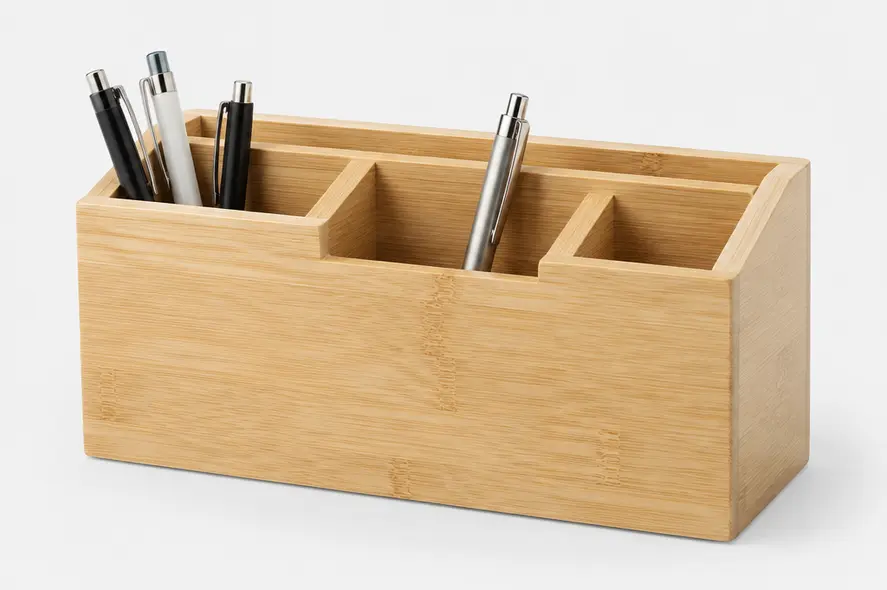
Example. The made-up supplier title is "BAMBOO DESK ORGANISER PEN HOLDER NOTE HOLDER OFFICE DESKTOP STORAGE BOX 3 COMPARTMENT": 85 characters in capital letters, and eBay's title limit is 80. After optimising, the sample title reads "Woodlark Bamboo Desk Organiser with Pen Holders, 3 Compartments, Natural": 72 characters, within the limit, assuming the supplier’s specification confirms the brand, finish and compartment count.
3. Check the photos and the brand
The extension captures the photos on the page. Put the main photo first, remove any you do not want and add others by link. A brand is filled in only when the supplier's page states one. If it is unclear, GetSellerOS asks you rather than guessing.
Look at: is the main photo the item you will send? Do you have the right to use these photos on eBay? Check this with the supplier if you are not sure. GetSellerOS does not decide it for you.
4. See the profit
Next to the content, GetSellerOS shows a suggested price with eBay fees, postage, packaging and your cost of goods taken off, ending in an estimated profit. The fee rates come from the figures you confirm in your settings. If the estimate is a loss, the listing cannot be published.
Example. In the made-up listing the supplier cost is £8.00 and supplier delivery is £3.50. The settings say 12.8% plus £0.30 for eBay fees, and £0.50 for packaging. At a suggested price of £18.87, the fee is £2.72, so the deductions are £8.00 + £3.50 + £2.72 + £0.50 = £14.72. Estimated profit is £18.87 − £14.72 = £4.15, which is 22.0% of the sale price. Those rates are sample figures, not a fee quote. For a full worked sum with margin, markup, break-even price and returns, read how to calculate your eBay profit.
Look at: are the fee rates in your settings the ones on your own eBay fees page today? An estimate is only as good as the rates behind it.
5. Run the checks and publish
Before a listing can go out, GetSellerOS checks the title length against eBay's limit, and checks the wording and brand against a built-in list of prohibited terms and VeRO brands. That is a check, not a clearance. The lists are a known subset of eBay's rules, and you remain responsible for what you list. When you are happy, you approve it and publish to your connected eBay store.
Look at: if anything about the item is unusual (a well-known brand, a safety-related product, a restricted category), check eBay's own policy pages before you publish. Do not rely on "nothing matched".
What GetSellerOS does not do
It does not publish anything on its own, and it does not watch your suppliers for stock changes in the background. It reminds you to re-check stock, and the extension can check a supplier's page when you are on it.
Your next step
- Pick one product you already know well, import it and read what the extension captured.
- Compare the suggested price and estimated profit with your own sum.
- Change one thing at a time (the price, the packaging figure, the title), and watch what each change does to the estimate.
If you do not have GetSellerOS yet, the button below shows where you can start.